CMA Dynamic Fields
In this article
In this article group
- Your First CMA Report
- Finding and Selecting Comparables
- CMA Polygon Tool
- Add Missing Sales and Listings
- Adding Comments to Comparables
- Export a List of Comparable Properties
- CMA Batch AI Commentary
- Sharing a CMA with clients
- Customise your CMA
- Saving CMA Templates
- Update Property Details in CMA
- CMA for Multiple Subject Properties
- Create a CMA for a property not found in Relab
- CMA Agent Profile
- CMA Collaboration
- Changing Page Margins in your CMA
- Adding a Watermark to a CMA Page
- Auto-collaborate on CMAs
Dynamic fields fill in details automatically from the subject property, the agent's profile, the vendor's details and the comparables, so nobody has to retype them in every CMA. This article lists every field, with an example of what it shows and what it means.
How to insert a dynamic field
Click into a text box.
Type @. A list of fields opens, showing each field's name, its category and its value for the current property.
Keep typing to filter the list, or scroll to find the field.
Click the field to insert it.
You can also browse the fields by category under Dynamic Fields in the Text tab of the Page Builder.
In the editor, a field shows in curly brackets, for example {{Address}}. In the finished CMA it shows the real value, for example 12 Kauri Lane.
Tip: build fields into sentences, for example Dear {{Nickname}}, or Kind regards, {{Agent Nickname}}.
Subject Property (30 fields)
These fields fill in from the property the CMA is for. They can't be edited by hand. If a value is wrong, report it from the property's Council Records tab (see Updating Records for a Property).
Field | Example | What it shows |
|---|---|---|
Address | 12 Kauri Lane | The street address of the subject property |
Suburb | Ponsonby | The suburb the property is in |
City | Auckland | The town or city the property is in |
Full Address | 12 Kauri Lane, Ponsonby | Street address and suburb |
Full Address City | 12 Kauri Lane, Ponsonby, Auckland | Street address, suburb and city |
Bedrooms | 3 | Number of bedrooms |
Bathrooms | 2 | Number of bathrooms |
Parking | 1 | Number of parking spaces |
Land Size | 600m² | Land area of the property |
Floor Size | 150m² | Floor area of the building |
Last Sale Date | 14/08/2015 | Date the property last sold |
Last Sold Price | $720,000 | Price the property last sold for |
Capital Value | $1,350,000 | Council capital value (CV): land and improvements together |
CV Year | 2024 | Year of the latest council valuation |
Land Value | $900,000 | Council value of the land only |
Improvement Value | $450,000 | Council value of the buildings and other improvements (CV minus land value) |
Rates | $3,850 | Annual council rates |
Build Era | 1960 | The decade the house was built |
Zoning | Residential – Mixed Housing Suburban | Council zoning for the property |
Title Type | freehold | Type of title: freehold, cross lease, unit title and so on |
Wall Material | Weatherboard | Main exterior wall material |
Roof Material | Steel/G-Iron | Main roof material |
Pool | Yes | Whether the property has a pool |
Property Category | RD196B | The council's property category code |
Record of Title | NA12B/345 | The record of title (certificate of title) reference |
Valuation Reference | 1234/56700 | The council valuation reference number |
Legal Description | Fee Simple, 1/1, Lot 2 Deposited Plan 45678, 600 m² | The legal description from the title |
Title Issue Date | 03/05/1998 | Date the title was issued |
Land Value per m² | $1,500.00/m² | Land value divided by land size |
CV per Floor m² | $9,000.00/m² | Capital value divided by floor size |
When there's no data for a field, it shows No record. If a field shows No record on a page you've designed, consider whether that field belongs there.
Agent Details (78 fields)
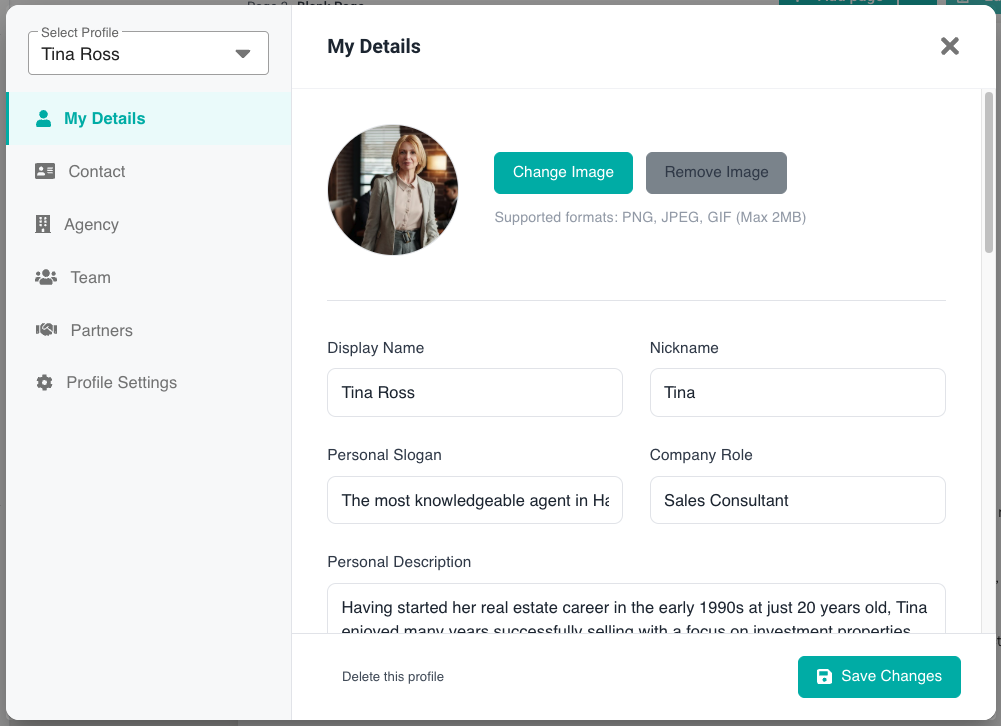
These fields fill in from the CMA Agent Profile, which each agent fills in themselves. If a field is blank, the agent hasn't added that detail to their profile yet. To change a value, update the profile. Don't change it in the CMA. In the @ list these fields are labelled Profile.
Some fields appear twice under different names, for example Email and My Email. They show the same value, so use either one. They're listed together below.
Primary agent
Field | Example | What it shows |
|---|---|---|
Display Name / Provided by | Sam Taylor | The agent's full name as it should appear in CMAs. Both fields show the same value |
Agent Nickname | Sam | The name the agent goes by, for sign-offs |
Email / My Email | sam@kowhairealty.co.nz | The agent's email address. Both fields show the same value |
Mobile Phone / My Phone | 021 555 0123 | The agent's mobile number. Both fields show the same value |
Office Phone / Office Number | 09 555 0100 | The agent's office number. Both fields show the same value |
Website | https://www.kowhairealty.co.nz/sam-taylor | The agent's website or profile page. It appears twice in the @ list; both show the same value |
Company | Kōwhai Realty Ltd | The agent's company name |
Address | 45 Harbour Road, Ponsonby | The agent's own business address |
facebook.com/samtaylorrealestate | Link to the agent's Facebook page | |
instagram.com/samtaylor.re | Link to the agent's Instagram | |
linkedin.com/in/samtaylor | Link to the agent's LinkedIn profile | |
Personal Description | Sam has sold homes in Ponsonby for over ten years… | The agent's bio |
Personal Slogan | Local knowledge, real results | The agent's tagline |
Company Role | Sales Consultant | The agent's job title |
First Testimonial | Sam made selling our home stress-free… | The text of the agent's first testimonial |
First Testimonial Name | Alex Morgan | The person who gave the first testimonial |
First Testimonial Date | 2026-03-12 | The date of the first testimonial |
Second Testimonial | Great communication from start to finish… | The text of the agent's second testimonial |
Second Testimonial Name | Priya Shah | The person who gave the second testimonial |
Second Testimonial Date | 2026-06-02 | The date of the second testimonial |
Agency
Field | Example | What it shows |
|---|---|---|
Agency Name | Kōwhai Realty | The agency or office name |
Agency Phone | 09 555 0100 | The agency's main phone number |
Agency Address | 45 Harbour Road | The agency's street address |
Agency Suburb | Ponsonby | The agency's suburb |
Agency City | Auckland | The agency's city |
Second and third agents
Use these on dual-agent and team versions of a page. Each field works the same way as the primary agent's field of the same name, but pulls from the second or third agent's profile.
Field | Example | What it shows |
|---|---|---|
Second Agent Name | Jordan Lee | The second agent's display name |
Second Agent Nickname | Jordan | The second agent's nickname |
Second Agent Phone | 027 555 0456 | The second agent's phone number |
Second Agent Email | jordan@kowhairealty.co.nz | The second agent's email address |
Second Agent Facebook / Instagram / LinkedIn | linkedin.com/in/jordanlee | The second agent's social media links |
Second Agent Personal Description | Jordan joined Kōwhai Realty in 2019… | The second agent's bio |
Second Agent Personal Slogan | Here for every step | The second agent's tagline |
Second Agent Company Role | Sales Associate | The second agent's job title |
Second Agent First / Second Testimonial | Jordan went above and beyond… | The second agent's testimonials, each with a matching Name and Date field |
The Third Agent fields are the same as the second agent's: Name, Nickname, Phone, Email, Facebook, Instagram, LinkedIn, Personal Description, Personal Slogan, Company Role, and First and Second Testimonial with their Name and Date fields.
Field | Example | What it shows |
|---|---|---|
Salesperson 1 Phone | 021 555 0123 | Phone number of the first agent on the CMA |
Salesperson 2 Phone | 027 555 0456 | Phone number of the second agent on the CMA |
Salesperson 3 Phone | 022 555 0789 | Phone number of the third agent on the CMA |
Images
Image fields pull pictures from the agent's profile. Use them in an image element set to Dynamic, not in a text box.
Field | What it shows |
|---|---|
Profile Image | The agent's headshot |
Large Profile Image | A larger or full-length photo of the agent |
Signature Image | The agent's signature |
Banner Image | The agent's banner image |
Team Image | A photo of the agent's team |
Agency Logo | The agency logo |
Second Agent Profile Image / Signature Image / Large Image | The second agent's headshot, signature and large photo |
Third Agent Profile Image / Signature Image / Large Image | The third agent's headshot, signature and large photo |
Vendor Details (4 fields)
These fields fill in from Owner Details in the CMA editor's left-hand panel. The agent enters them for each CMA.
Field | Example | What it shows |
|---|---|---|
Prepared for | Chris and Dana Walker | The vendor's name or names |
Nickname | Chris and Dana | How the vendor is addressed in letters, for example Dear {{Nickname}}, |
Prepared for Email | chris.walker@email.co.nz | The vendor's email address |
Prepared for Phone | 021 555 0789 | The vendor's phone number |
Tip: Nickname is the vendor's name. Agent Nickname is the agent's. Check you've picked the right one in letter greetings and sign-offs.
Tip: Prepared for can be long when there are several owners or a trust. Make the text box big enough so the name isn't cut off.
Price Estimates (18 fields)
In the @ list these fields are labelled Customization.
Price estimate
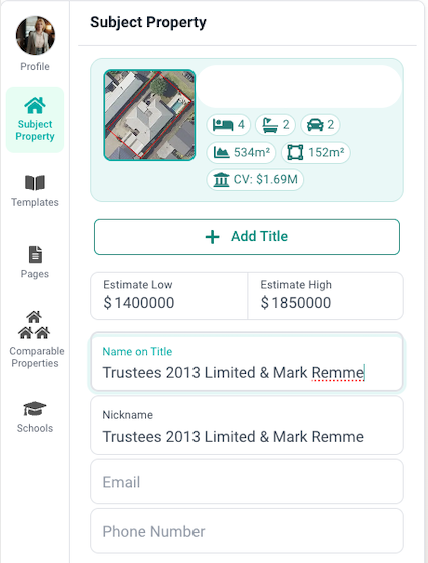
These fields start with the REINZ estimate for the property. The agent should then update them to their own price estimate for the CMA.
Field | Example | What it shows |
|---|---|---|
Estimate Low | $1,300,000 | The low end of the price estimate |
Estimate High | $1,400,000 | The high end of the price estimate |
Estimate Mid | $1,350,000 | The midpoint between the low and high estimates |
Estimate Range | $1,300,000 – $1,400,000 | The low and high estimates shown together |
Comparable sales summary
These are worked out from the sale prices of the comparable sales selected for the CMA.
Field | Example | What it shows |
|---|---|---|
Sales Low | $1,180,000 | The lowest sale price among the comparables |
Sales High | $1,520,000 | The highest sale price among the comparables |
Sales Mean | $1,342,000 | The average sale price of the comparables |
Sales Median | $1,310,000 | The middle sale price of the comparables |
Sales Range | $1,180,000 – $1,520,000 | The lowest and highest sale prices shown together |
REINZ automated valuation
Field | Example | What it shows |
|---|---|---|
REINZ AVM Low | $1,250,000 | The low end of the REINZ automated valuation |
REINZ AVM | $1,340,000 | The REINZ automated valuation |
REINZ AVM High | $1,430,000 | The high end of the REINZ automated valuation |
REINZ AVM Range | $1,250,000 – $1,430,000 | The REINZ low and high values shown together |
Commission: these are set in CMA Centre
Field | Example | What it shows |
|---|---|---|
Commission | $49,000 | The commission amount, worked out from the commission rate and the high estimate |
Commission GST | $7,350 | The GST on the commission |
Commission (incl. GST) | $56,350 | The commission including GST |
Commission breakdown | 3.5% × $1,400,000 = $49,000 | The commission calculation written out |
Commission summary | 3.5% × $1,400,000 = $49,000 | A summary of the commission calculation |
Date (5 fields)
Field | Example | What it shows |
|---|---|---|
Date | 22 October 2026 | Today's date, in the format you choose |
Year | 2026 | The current year |
Month | October | The current month |
Time | 1:15 pm | The current time |
Total pages | 19 | The number of pages in the CMA |
Tip: use Total pages to check whether a CMA will print as a booklet. The page count needs to be a multiple of 4.
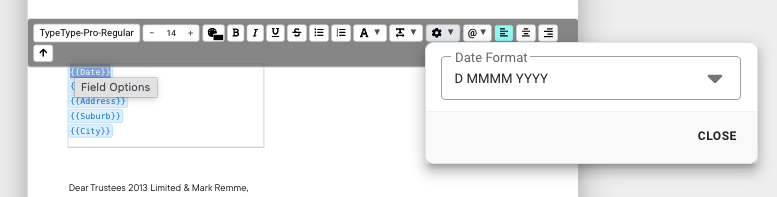
Change the date format
Open the page in the Page Builder.
Click into the text box that holds the Date field.
In the toolbar, click the cog icon.
Choose a format from the Date Format list. For example, D MMMM YYYY shows 22 October 2026.
Click Close.
Comparable sales (26 fields per comparable, up to 5 comparables)
A CMA can include up to 5 comparable sales, and each one gets its own set of fields. The Item number is the comparable's position in the CMA: Item 1 is the first comparable sale, Item 2 the second, through to Item 5.
The table shows the fields for Item 1. For the other comparables, use the same field with a different number, for example Comparable Sales › Item 3 › Price is the sale price of the third comparable.
In the Page Builder, you can also find these fields under Nearby Sales in the Text tab, grouped by each comparable's address.
The fields follow the order of the comparables in the CMA. If an agent adds, removes or reorders comparables, the values change to match.
Field | Example | What it shows |
|---|---|---|
Comparable Sales › Item 1 › Address | 8 Rimu Street | The comparable's street address |
Comparable Sales › Item 1 › Suburb | Ponsonby | The comparable's suburb |
Comparable Sales › Item 1 › City | Auckland | The comparable's city |
Comparable Sales › Item 1 › Land | 450m² | Land area |
Comparable Sales › Item 1 › Title Type | freehold | Type of title |
Comparable Sales › Item 1 › Land Area | freehold 450m² | Type of title and land area |
Comparable Sales › Item 1 › Zoning | Residential – Mixed Housing Urban | Council zoning |
Comparable Sales › Item 1 › Floor Area | 160m² | Floor area of the building |
Comparable Sales › Item 1 › CV | $1,200,000 | Council capital value |
Comparable Sales › Item 1 › LV | $800,000 | Council land value |
Comparable Sales › Item 1 › LV Ratio | 67% | Land value as a percentage of CV |
Comparable Sales › Item 1 › Bedrooms | 3 | Number of bedrooms |
Comparable Sales › Item 1 › Bathrooms | 2 | Number of bathrooms |
Comparable Sales › Item 1 › Parking | 1 | Number of parking spaces |
Comparable Sales › Item 1 › Year Built | 1955 | The year or decade the house was built |
Comparable Sales › Item 1 › Cladding | Weatherboard | Main exterior wall material |
Comparable Sales › Item 1 › Roof | Steel/G-Iron | Main roof material |
Comparable Sales › Item 1 › Pool | No | Whether the property has a pool |
Comparable Sales › Item 1 › Land Use | Residential | Council land use |
Comparable Sales › Item 1 › Property Type | Residential dwelling | Type of property |
Comparable Sales › Item 1 › Sale to CV | +5% | How far the sale price was above or below CV |
Comparable Sales › Item 1 › Price | $1,260,000 | The sale price |
Comparable Sales › Item 1 › Sale Date | 2026-09-14 | The date it sold |
Comparable Sales › Item 1 › Land Price Per SQM | $2,800 | Sale price divided by land area |
Comparable Sales › Item 1 › Floor Price Per SQM | $7,875 | Sale price divided by floor area |
Comparable Sales › Item 1 › Days on Market | 28 | How many days it was on the market before selling |
Comparable listings (24 fields per listing, up to 5 listings)
Comparable listings work the same way, from Comparable Listings › Item 1 to Item 5. They have no Zoning, Sale to CV, Price, Sale Date or price-per-square-metre fields, but they add Listing Method, Ask Price, Listed Date and Price Type.
Field | Example | What it shows |
|---|---|---|
Comparable Listings › Item 1 › Address | 21 Tōtara Avenue | The comparable's street address |
Comparable Listings › Item 1 › Suburb | Ponsonby | The comparable's suburb |
Comparable Listings › Item 1 › City | Auckland | The comparable's city |
Comparable Listings › Item 1 › Land | 450m² | Land area |
Comparable Listings › Item 1 › Title Type | freehold | Type of title |
Comparable Listings › Item 1 › Land Area | 450m² | Land area |
Comparable Listings › Item 1 › Floor Area | 160m² | Floor area of the building |
Comparable Listings › Item 1 › CV | $1,200,000 | Council capital value |
Comparable Listings › Item 1 › LV | $800,000 | Council land value |
Comparable Listings › Item 1 › LV Ratio | 67% | Land value as a percentage of CV |
Comparable Listings › Item 1 › Bedrooms | 3 | Number of bedrooms |
Comparable Listings › Item 1 › Bathrooms | 2 | Number of bathrooms |
Comparable Listings › Item 1 › Parking | 1 | Number of parking spaces |
Comparable Listings › Item 1 › Year Built | 1955 | The year or decade the house was built |
Comparable Listings › Item 1 › Cladding | Weatherboard | Main exterior wall material |
Comparable Listings › Item 1 › Roof | Steel/G-Iron | Main roof material |
Comparable Listings › Item 1 › Pool | No | Whether the property has a pool |
Comparable Listings › Item 1 › Land Use | Residential | Council land use |
Comparable Listings › Item 1 › Property Type | Residential dwelling | Type of property |
Comparable Listings › Item 1 › Listing Method | Enquiries over $1,250,000 | How the property is being marketed, as advertised |
Comparable Listings › Item 1 › Ask Price | $1,295,000 | The advertised asking price |
Comparable Listings › Item 1 › Listed Date | 2026-09-01 | The date it was listed |
Comparable Listings › Item 1 › Price Type | sale | The type of advertised price, for example auction, enquiries over or asking price |
Comparable Listings › Item 1 › Days on Market | 21 | How many days it has been listed |
❓ FAQs
Why is a field blank in the CMA?
The information is missing at the source. Agent fields need the CMA Agent Profile filled in. Vendor fields need Owner Details filled in. Property fields show No record when there's no data.
Can I change the value a field shows?
Not in the CMA. Update the source instead: the agent profile, Owner Details or the property's council record. You can also delete the field and type the text in, but it will no longer update automatically.
Why is the text cut off?
The value is longer than the text box. Make the box bigger or the font smaller, especially for Prepared for, Legal Description and Personal Description.
A comparable field shows the wrong property.
Comparable fields follow the order of the comparables. If the agent reorders or changes comparables, Item 1 becomes whichever comparable is now first.
Can I format a field?
Yes. Change its font, size, colour and alignment like any other text.
Last updated: 22 October 2026