
Search by Consent Types
Find properties with recent building or resource consents to identify development activity, renovations, or subdivisions.
⚠️ To use Consent Type Search, you must have access to the Relab Premium Plan. This feature is currently only available in Auckland.
How to search for Consents using Relab Premium
- Open Relab Premium (Waffle icon on home page)
- Choose your search method
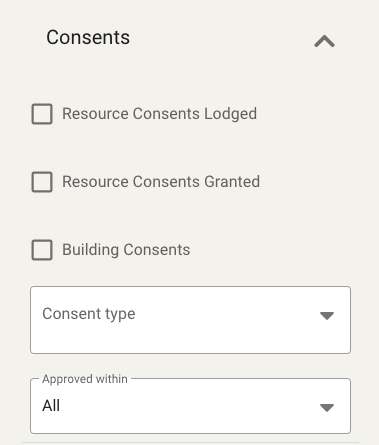
- Find Consent Filters in the left side panel
- Select your Consent Status; Resource Consents Lodged, Resource Consents Granted or Building Consents
- Narrow by Consent Type (optional) e.g developments, subdvision, alterations etc
- Set time frame using Approved Within
Your results will update automatically as you apply filters.
🔥 Hot Tip: You must select at least one consent status checkbox (step 4) for the filters to work. Selecting only consent type without a status won't return results.
Click on address to open property panel and review specifics of building consent.
FAQs
How come the consent filters are not working in Relab Premium?
Currently our Consent Type filter is only available for Auckland Properties in Relab Premium. However we have consent data in Relab Pro in other regions which you can see by property or on the map.